3/01/2015


Odesk Adobe Photoshop CS4 Test 2013-2914 Answer
Odesk Adobe Photoshop CS4 Test 2013-2014 Answer: (ওডেক্স ফটোসফ সিএস৪ টেস্ট উত্তর) :
What is the use of the Monochromatic option in the Add Noise dialog box as shown in the picture?
a. It reduces noise by changing dissimilar pixels.
c. It reduces noise in an image by blending the brightness of the pixels within a selection.
While using a smudge tool, if the "Sample All Layers" option is selected, how will the smudge tool behave?
a. It will sample all the visible layers and smudge respectively each layer
b. It will sample all the visible layers and smudge only the active layer
c. It will sample only the active layer and smudge all the visible layers
d. It will sample only the active layer and smudge only the active layer
The Divide Slice dialog box can not be used to divide:
a. User slice
b. Auto slice
c. Layer-based slice
Which of the following layers affects all the layers below it?
a. The Adjustment layer
b. The Fill layer
c. Both a and b
Which slice type will you choose to enter HTML text as shown in the picture?
a. A
b. B
c. Both a and b
Which type of layers contains information required for alignment?
a. Adjustment layers
b. Vector layers
c. Smart objects
d. None of the above
a. A
b. B
c. C
d. No mode is used.
Which of the following properties of a 3D layer can not be animated?
a. 3D object or camera position
b. 3D render settings
c. 3D cross section
d. None of the above
When does Layer → Arrange → Reverse option appear active?
a. When you have at least one layer selected.
b. When you have at least two layers selected.
c. It is always active by default.
d. When you flatten an image.
Which Auto-Align layers option aligns layers and matches overlapping content without changing the shape of the objects in the image as shown in the picture?
a. A
b. B
c. C
d. D
Which type of the blending mode is supported by layers that use the Fill With Neutral Color option?
a. Normal
b. Dissolve
c. Luminosity
d. None of the above
Which among the labeled buttons in the given diagram will you use to have a changed position attribute apply to all other frames in the active layer in the frame animation mode?
a. A
b. B
c. C
d. D
How would you apply a layer style to a background layer?
a. You cannot apply layer styles to a background layer.
b. First convert the background layer into a regular layer.
c. First export the background layer.
a. Apply Image command
b. Calculations command
c. Both a and b
a. AI
b. FLA
c. MPEG
d. JPEG
You can move Alpha or Spot channels above the default color channels only when the image is in the __________ mode?
a. RGB
b. Duotone
c. LAB
d. Multichannel
Which of the following types of swatches can be shared between applications? (choosing colors)
a. HSB
b. Duotone
c. WebRGB swatches from Photoshop
d. Solid swatches
Which command is used to delete footage in one or more layers in the timeline mode?
a. Extract Work Area
b. Lift Work Area
c. Split Layer
In the given picture, which Reconstruction mode in the Liquify filter scales back distortions uniformly without any kind of smoothing?
a. A
b. B
c. C
Which condition should be satisfied first to transform video layers?
a. Rasterize video layers
b. Move video layers
c. Convert video layers to Smart Objects
Which interpolation method will you use to animate a visiblity layer when you want the layer to appear or disappear suddenly across the timeline?
a. Linear Interpolation
b. Hold Interpolation
c. Quick Interpolation
Which option in the given picture displays Normals as default render presets?
a. A
b. B
c. C
d. D
Which option of Create UV Overlay shows model areas using a solid rendering mode?
a. Wireframe
b. Shaded
c. Normal Map
In the given picture, the Conté Crayon filter(sketch filter) uses the foreground color for:
a. Light areas
b. Dark areas
c. Transparency
In the File Info dialog box, which information is not displayed in a browser but is added to the HTML file as a comment and to the image file as metadata?
a. Title information
b. Copyright information
c. Both a and b
Which mode in the animation panel shows the frame duration and animation properties for document layers?
a. The Frame mode
b. The Timeline mode
c. Both a and b
In which frame disposal method does a disposal icon not appear on the frame?
a. When you choose the Do Not Dispose method.
b. When you choose the Dispose method.
c. When you choose the Automatic method.
If there is no background, Deep knocks out to which of the following options as shown in the picture?
a. Deep knockout appears dim.
b. Deep knocks out to Shallow option.
c. Deep knocks out to transparency.
In which option is the selection placed in a channel in your active image by default as shown in the picture?
a. A
b. B
c. C
Which command allows you to use free memory used by the History Panel, or the Clipboard?
a. Fade
b. Clear
c. Purge
For previewing which of the following image modes is the 32-Bit Preview option not available?
a. 32 Bit RGB
b. 32 Bit Grayscale
c. 16 Bit RGB
Which action can not be undone?
a. File → Revert
b. Edit → Purge → Histories
c. Both a and b
Which Texture filter is used on picture A to produce the result of picture B, as shown in the picture?
a. Craquelure
b. Patchwork
c. Texturizer
d. Grain
Which option in the info panel box displays values in the current color mode of the image as shown in the picture?
a. A
b. B
c. C
d. D
When is an image flattened?
a. When you delete an Alpha channel
b. When you delete a Spot channel
c. When you delete a Quick Mask
d. None of the above
In the Save for Web dialog box, when multiple slices using different color tables are selected for saving as gif images, the color table shows up for:
a. the first slice in the selection
b. the last slice in the selection
c. all the slices in the selection
d. the color table does not show up at all
Which Artistic filter is used on picture A to produce picture B as shown in the picture?
a. Paint Daubs
b. Palette Knife
c. Plastic Wrap
d. Poster Edges
Which type of slices has gray symbols as shown in the picture?
a. User slices
b. Layer-based slices
c. Auto slices
Which channel would you choose for grayscale images in the Color Halftone Filter dialog box as shown in the picture?
a. A
b. B
c. C
d. D
Which color mode does not support layers?
a. RGB
b. CMYK
c. The Multichannel mode
The Photoshop Extended Measurement Feature can be used for measuring area selected by the:
a. Rectangular Marquee Tool.
c. Crop Tool
d. Spot Healing Brush Tool
Which file format does Vanishing Point support to preserve the perspective plane information?
a. PSD
b. TIFF
c. JPEG
d. All of the above
When does white color appear in the histogram and RGB levels in Camera Raw as shown in the picture?
a. When three channels among RGB overlap.
b. When two channels among RGB overlap.
c. When a style is applied to an image.
While using the Action Pane in the button mode, how would you exclude all the commands in an action except the selected one?
a. By using Alt+Click (Windows) or Option+Click (Mac) to clear the check box on the left of the command.
b. By clicking to clear the check box on the left of the Action or the Set Name.
c. You cannot exclude commands in the button mode.
Which option would you choose to display the HDR color picker?
a. In the toolbox, click the foreground or background color selection box.
b. In the Color panel, click the set foreground color or set background color selection box.
c. Both a and b.
In Paint Mask mode, which area does blue color highlight in the given image?
a. It shows areas good for painting.
b. It shows areas where paint will be undersampled.
c. It shows areas where paint will be oversampled.
d. It shows that the area has a missing channel information.
What would you use to insert non-recordable commands into an action?
a. Insert Stop
b. Insert Path
c. Insert Menu Item Command
Which 3D tool is used to rotate the camera around the z-axis?
a. The 3D Rotate tool
b. The 3D Roll tool
c. The 3D Roll View tool
What will happen if you enter a negative value in the roundness option of a postcrop vignette in the camera raw dialog box as shown in the picture?
a. A negative value will make the effect more circular.
b. A negative value will make the effect more oval.
c. A negative value will make the effect more rectangular.
d. You can not enter a negative value.
To paint or clone on video frames contained by a smart object, you can:
a. directly paint or clone on the video frames.
b. insert a new layer above the video frames and paint or clone on the new layer.
c. Both a and b.
What values would you enter in the focal plane box to move the plane in the 3D render settings box as shown in the picture?
a. Enter negative values to move the plane forward.
b. Enter negative values to move the plane backward.
c. You can not enter negative values in this box.
As shown in the image, which option would you select to increase or decrease the tiling for texture?
a. A
b. B
c. Both a and b
To change the settings for a command within an action or pauses in an action so that you can specify values in a dialog box, You will use:
a. Insert stop
b. Modal control
c. Stop recording
Which Quick Mask option sets masked areas to white (transparent) and selected areas to black (opaque) as shown in the picture?
a. A
b. B
c. Both a and b
For the type and shape layer, which lock options are selected by default and cannot be deselected as shown in the picture?
a. A and B
b. B and C
c. A, B and C
d. C only
Which option would you choose to crop to the original size of the page while placing a PDF file in photoshop as shown in the picture?
a. A
b. B
c. C
d. D
For which type of the following options is Auto Blend Layers available?
a. Video layers
b. 3D layers
c. RGB Images
d. Background layers
When does the Cached Data Warning icon appear in the Histogram panel?
a. When a histogram is read from the current state of the document instead of a cache.
b. When a histogram is read from a cache instead of the current state of the document.
c. Both a and b.
Which type of blending modes is not available for the Apply Image and Calculations commands?
a. Add
b. Subtract
c. Both a and b are available
d. Neither a nor b is available
When does the 3D Axis appear?
a. When you have a 3D layer
b. When the 3D tool is selected.
c. Both a and b.
What can you not copy using duplicate command on an image?
a. Layers
b. Layer masks
c. Channels
d. None of the above
Which save options are not available in the Batch or Create Droplet commands?
a. JPEG compression
b. TIFF
c. Both a and b
While using the Action Panel in the button mode, how would you exclude all the commands in an action except the selected one?
a. By using Alt+Click (Windows) or Option+Click (Mac) to clear the check box on the left of the command.
b. By clicking to clear the check box on the left of the Action or the Set Name.
c. You cannot exclude commands in the button mode.
In All Channels View, the individual histograms do not include:
a. Alpha Channels
b. Spot Channels
c. Masks
d. All of the above
Which command would you use to re-link the video layer to the source file?
a. Interpret Footage
b. Show Altered Video
c. Replace Footage
Which option would you choose to open the HDR color picker dialog box while editing a 32- bpc image?
a. In the toolbox, click the foreground or background color selection box.
b. In the Color panel, click the set foreground color or set background color selection box.
c. Both a and b.
Merging of channels is possible only:
a. when images are in the grayscale mode.
b. when images are flattened.
c. when more than one image open for the merge channel option to be available.
d. All of the above.
Which type of channels is created automatically when you open a new image?
a. Alpha channels
b. Spot color channels
c. Color information channels
Which of the following photoshop tools can be used to edit an HDR/32-bpc image?
a. Gradient
b. Magic Wand
c. Pen Tool
d. Blur Tool
Which command is used to delete footage in one or more layers and leaving the gap of same duration in the timeline mode?
a. Extract Work Area
b. Lift Work Area
c. Split Layer
Which color mode supports the Match Color command?
a. Bitmap
b. CMYK
c. LAB
d. RGB
The scale styles option is available only when:
a. the Resample Image is selected
b. Constrain Proportions is selected
c. the Resample Image as well as Constrain Proportions is selected
Which option would you choose to set the timeline duration you want to preview in the Animation panel?
a. Drag either end of the work area bar.
b. Drag the work area bar over the section you want to preview.
c. Move the current-time indicator to the time or frame you want. From the Animation panel menu, choose either Set Start of Work Area or Set End of Work Area.
d. All of the above
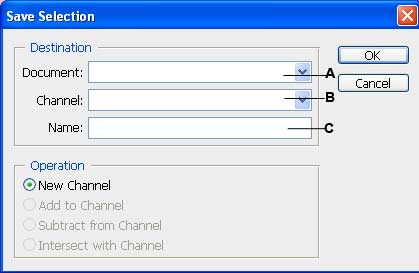
Which of the following will list the saved selections when dialog box appears same as shown in the image given above?
a. A
b. B
c. C
Adobe Photoshop CS4 Extended Test
What is the use of the Monochromatic option in the Add Noise dialog box as shown in the picture?
a. It reduces noise by changing dissimilar pixels.
b. It applies the filter to only the tonal elements in the image without changing the colors.
c. It reduces noise in an image by blending the brightness of the pixels within a selection.
While using a smudge tool, if the "Sample All Layers" option is selected, how will the smudge tool behave?
a. It will sample all the visible layers and smudge respectively each layer
b. It will sample all the visible layers and smudge only the active layer
c. It will sample only the active layer and smudge all the visible layers
d. It will sample only the active layer and smudge only the active layer
The Divide Slice dialog box can not be used to divide:
a. User slice
b. Auto slice
c. Layer-based slice
Which of the following layers affects all the layers below it?
a. The Adjustment layer
b. The Fill layer
c. Both a and b
Which slice type will you choose to enter HTML text as shown in the picture?
a. A
b. B
c. Both a and b
Which type of layers contains information required for alignment?
a. Adjustment layers
b. Vector layers
c. Smart objects
d. None of the above
Which smart blur mode has been used as shown in the preview in the given image?
a. A
b. B
c. C
d. No mode is used.
Which of the following properties of a 3D layer can not be animated?
a. 3D object or camera position
b. 3D render settings
c. 3D cross section
d. None of the above
When does Layer → Arrange → Reverse option appear active?
a. When you have at least one layer selected.
b. When you have at least two layers selected.
c. It is always active by default.
d. When you flatten an image.
Which Auto-Align layers option aligns layers and matches overlapping content without changing the shape of the objects in the image as shown in the picture?
a. A
b. B
c. C
d. D
Which type of the blending mode is supported by layers that use the Fill With Neutral Color option?
a. Normal
b. Dissolve
c. Luminosity
d. None of the above
Which among the labeled buttons in the given diagram will you use to have a changed position attribute apply to all other frames in the active layer in the frame animation mode?
a. A
b. B
c. C
d. D
How would you apply a layer style to a background layer?
a. You cannot apply layer styles to a background layer.
b. First convert the background layer into a regular layer.
c. First export the background layer.
Which command cannot be applied to composite channels?
a. Apply Image command
b. Calculations command
c. Both a and b
Which format can be used to save your camera raw file in Photoshop?
a. AI
b. FLA
c. MPEG
d. JPEG
You can move Alpha or Spot channels above the default color channels only when the image is in the __________ mode?
a. RGB
b. Duotone
c. LAB
d. Multichannel
Which of the following types of swatches can be shared between applications? (choosing colors)
a. HSB
b. Duotone
c. WebRGB swatches from Photoshop
d. Solid swatches
Which command is used to delete footage in one or more layers in the timeline mode?
a. Extract Work Area
b. Lift Work Area
c. Split Layer
In the given picture, which Reconstruction mode in the Liquify filter scales back distortions uniformly without any kind of smoothing?
a. A
b. B
c. C
Which condition should be satisfied first to transform video layers?
a. Rasterize video layers
b. Move video layers
c. Convert video layers to Smart Objects
Which interpolation method will you use to animate a visiblity layer when you want the layer to appear or disappear suddenly across the timeline?
a. Linear Interpolation
b. Hold Interpolation
c. Quick Interpolation
Which option in the given picture displays Normals as default render presets?
a. A
b. B
c. C
d. D
Which option of Create UV Overlay shows model areas using a solid rendering mode?
a. Wireframe
b. Shaded
c. Normal Map
In the given picture, the Conté Crayon filter(sketch filter) uses the foreground color for:
a. Light areas
b. Dark areas
c. Transparency
In the File Info dialog box, which information is not displayed in a browser but is added to the HTML file as a comment and to the image file as metadata?
a. Title information
b. Copyright information
c. Both a and b
Which mode in the animation panel shows the frame duration and animation properties for document layers?
a. The Frame mode
b. The Timeline mode
c. Both a and b
In which frame disposal method does a disposal icon not appear on the frame?
a. When you choose the Do Not Dispose method.
b. When you choose the Dispose method.
c. When you choose the Automatic method.
If there is no background, Deep knocks out to which of the following options as shown in the picture?
a. Deep knockout appears dim.
b. Deep knocks out to Shallow option.
c. Deep knocks out to transparency.
In which option is the selection placed in a channel in your active image by default as shown in the picture?
a. A
b. B
c. C
Which command allows you to use free memory used by the History Panel, or the Clipboard?
a. Fade
b. Clear
c. Purge
For previewing which of the following image modes is the 32-Bit Preview option not available?
a. 32 Bit RGB
b. 32 Bit Grayscale
c. 16 Bit RGB
Which action can not be undone?
a. File → Revert
b. Edit → Purge → Histories
c. Both a and b
Which Texture filter is used on picture A to produce the result of picture B, as shown in the picture?
a. Craquelure
b. Patchwork
c. Texturizer
d. Grain
Which option in the info panel box displays values in the current color mode of the image as shown in the picture?
a. A
b. B
c. C
d. D
When is an image flattened?
a. When you delete an Alpha channel
b. When you delete a Spot channel
c. When you delete a Quick Mask
d. None of the above
In the Save for Web dialog box, when multiple slices using different color tables are selected for saving as gif images, the color table shows up for:
a. the first slice in the selection
b. the last slice in the selection
c. all the slices in the selection
d. the color table does not show up at all
Which Artistic filter is used on picture A to produce picture B as shown in the picture?
a. Paint Daubs
b. Palette Knife
c. Plastic Wrap
d. Poster Edges
Which type of slices has gray symbols as shown in the picture?
a. User slices
b. Layer-based slices
c. Auto slices
Which channel would you choose for grayscale images in the Color Halftone Filter dialog box as shown in the picture?
a. A
b. B
c. C
d. D
Which color mode does not support layers?
a. RGB
b. CMYK
c. The Multichannel mode
The Photoshop Extended Measurement Feature can be used for measuring area selected by the:
a. Rectangular Marquee Tool.
b. Magic Wand Tool
c. Crop Tool
d. Spot Healing Brush Tool
Which file format does Vanishing Point support to preserve the perspective plane information?
a. PSD
b. TIFF
c. JPEG
d. All of the above
When does white color appear in the histogram and RGB levels in Camera Raw as shown in the picture?
a. When three channels among RGB overlap.
b. When two channels among RGB overlap.
c. When a style is applied to an image.
While using the Action Pane in the button mode, how would you exclude all the commands in an action except the selected one?
a. By using Alt+Click (Windows) or Option+Click (Mac) to clear the check box on the left of the command.
b. By clicking to clear the check box on the left of the Action or the Set Name.
c. You cannot exclude commands in the button mode.
Which option would you choose to display the HDR color picker?
a. In the toolbox, click the foreground or background color selection box.
b. In the Color panel, click the set foreground color or set background color selection box.
c. Both a and b.
In Paint Mask mode, which area does blue color highlight in the given image?
a. It shows areas good for painting.
b. It shows areas where paint will be undersampled.
c. It shows areas where paint will be oversampled.
d. It shows that the area has a missing channel information.
What would you use to insert non-recordable commands into an action?
a. Insert Stop
b. Insert Path
c. Insert Menu Item Command
Which 3D tool is used to rotate the camera around the z-axis?
a. The 3D Rotate tool
b. The 3D Roll tool
c. The 3D Roll View tool
What will happen if you enter a negative value in the roundness option of a postcrop vignette in the camera raw dialog box as shown in the picture?
a. A negative value will make the effect more circular.
b. A negative value will make the effect more oval.
c. A negative value will make the effect more rectangular.
d. You can not enter a negative value.
To paint or clone on video frames contained by a smart object, you can:
a. directly paint or clone on the video frames.
b. insert a new layer above the video frames and paint or clone on the new layer.
c. Both a and b.
What values would you enter in the focal plane box to move the plane in the 3D render settings box as shown in the picture?
a. Enter negative values to move the plane forward.
b. Enter negative values to move the plane backward.
c. You can not enter negative values in this box.
As shown in the image, which option would you select to increase or decrease the tiling for texture?
a. A
b. B
c. Both a and b
To change the settings for a command within an action or pauses in an action so that you can specify values in a dialog box, You will use:
a. Insert stop
b. Modal control
c. Stop recording
Which Quick Mask option sets masked areas to white (transparent) and selected areas to black (opaque) as shown in the picture?
a. A
b. B
c. Both a and b
For the type and shape layer, which lock options are selected by default and cannot be deselected as shown in the picture?
a. A and B
b. B and C
c. A, B and C
d. C only
Which option would you choose to crop to the original size of the page while placing a PDF file in photoshop as shown in the picture?
a. A
b. B
c. C
d. D
For which type of the following options is Auto Blend Layers available?
a. Video layers
b. 3D layers
c. RGB Images
d. Background layers
When does the Cached Data Warning icon appear in the Histogram panel?
a. When a histogram is read from the current state of the document instead of a cache.
b. When a histogram is read from a cache instead of the current state of the document.
c. Both a and b.
Which type of blending modes is not available for the Apply Image and Calculations commands?
a. Add
b. Subtract
c. Both a and b are available
d. Neither a nor b is available
When does the 3D Axis appear?
a. When you have a 3D layer
b. When the 3D tool is selected.
c. Both a and b.
What can you not copy using duplicate command on an image?
a. Layers
b. Layer masks
c. Channels
d. None of the above
Which save options are not available in the Batch or Create Droplet commands?
a. JPEG compression
b. TIFF
c. Both a and b
While using the Action Panel in the button mode, how would you exclude all the commands in an action except the selected one?
a. By using Alt+Click (Windows) or Option+Click (Mac) to clear the check box on the left of the command.
b. By clicking to clear the check box on the left of the Action or the Set Name.
c. You cannot exclude commands in the button mode.
In All Channels View, the individual histograms do not include:
a. Alpha Channels
b. Spot Channels
c. Masks
d. All of the above
Which command would you use to re-link the video layer to the source file?
a. Interpret Footage
b. Show Altered Video
c. Replace Footage
Which option would you choose to open the HDR color picker dialog box while editing a 32- bpc image?
a. In the toolbox, click the foreground or background color selection box.
b. In the Color panel, click the set foreground color or set background color selection box.
c. Both a and b.
Merging of channels is possible only:
a. when images are in the grayscale mode.
b. when images are flattened.
c. when more than one image open for the merge channel option to be available.
d. All of the above.
Which type of channels is created automatically when you open a new image?
a. Alpha channels
b. Spot color channels
c. Color information channels
Which of the following photoshop tools can be used to edit an HDR/32-bpc image?
a. Gradient
b. Magic Wand
c. Pen Tool
d. Blur Tool
Which command is used to delete footage in one or more layers and leaving the gap of same duration in the timeline mode?
a. Extract Work Area
b. Lift Work Area
c. Split Layer
Which color mode supports the Match Color command?
a. Bitmap
b. CMYK
c. LAB
d. RGB
The scale styles option is available only when:
a. the Resample Image is selected
b. Constrain Proportions is selected
c. the Resample Image as well as Constrain Proportions is selected
Which option would you choose to set the timeline duration you want to preview in the Animation panel?
a. Drag either end of the work area bar.
b. Drag the work area bar over the section you want to preview.
c. Move the current-time indicator to the time or frame you want. From the Animation panel menu, choose either Set Start of Work Area or Set End of Work Area.
d. All of the above
Which of the following will list the saved selections when dialog box appears same as shown in the image given above?
a. A
b. B
c. C
Which command does not convert the pixel edits to a video layer while managing colors in video layers?
a. The Assign Profile
b. The Convert To Profile
c. The Color Settings Profile
If one step in an action converts an image with a source mode of RGB to a target mode of CMYK, applying this action to an image in Grayscale mode will result in:
a. the conversion of the source Grayscale image to CMYK
b. the conversion of the source Grayscale image to RGB
c. the conversion of the source Grayscale image to RGB first and then to CMYK
d. an error
Which of the following options will let you use the white balance settings as provided by the camera in the camera raw dialog box as shown in the picture?
a. A
b. B
c. C
Which of the following information is not retained when a 3D file is opened in photoshop?
a. Textures
b. Rendering
c. Lighting
d. All of the above are retained
Which Interpolation(Tweening) method will you use to animate a visibility of a layer when you want the layer to appear or disappear suddenly across the timeline?
a. Linear Interpolation
b. Hold Interpolation
c. Quick Interpolation
A working space is an intermediate color space used to define and edit color In Adobe application.
a. True
Question:102
Which type of images are resolution-dependant?
a. Bitmap images.
Question:103
What do you mean by Kerning?
a. It is the process of adding and subtracting spaces between specific pairs of characters.
Question: 104
Which file format can be used to save Lab images?
d. All of the above.
Question: 105
Which among the following methods adds pixels by averaging the color values of the surrounding pixels and produces medium-quality results?
a. Bilinear
Question: 106
When is the Canvas Extension Color Menu not available as shown in the given image?
a. When an image does not contain a background layer.
ANOTHER SET
Question: 107
Ø Which of the Saving commands is available for an image that is managed by a Version Cue Workspace?
Check In
Question: 108
Ø Which option will you choose to select all layers of a similar type?
All of the above
Question:109
Ø Which of the following Filters cannot be applied to a Smart Object?
Pattern Maker
Question: 110
Ø With which of the given options does the Signal Strength Meter appear?
It appears when you choose 'merge to hdr command'
Question: 111
Ø Channels can not be added to which of the following image modes?
Bitmap
Question: 112
Ø Which among the following Modes does not support layers?
All of the above
Question: 113
Ø Which of the following is not true about Filters?
None of the above
Question: 114
Ø Which of the following is not true about the Curves dialog box?
The Curves dialog box lets you adjust up to 14 different points throughout an image's tonal range
Question: 115
Ø Which of the following Slices is created with the Slice Tool?
User slices
Question: 116
Ø Which of the following features is supported by the EPS file format?
It supports the Grayscale and Bitmap color modes
Question: 117
Ø Which among the following blending modes is available only for the Apply Image and Calculations commands?
Both a and b
Question: 118
Ø What is the use of the Make Work Path command in the Paths palette ?
It can alter the shape of a selection
Question: 119
Ø Which type of information is not displayed by the Info Palette?
It does not display the opacity of the current layer
Question: 120
Ø Which among the following is not a right option for selecting a web-safe color from the Color Palette?
Choose Current Color from the Color Palette Menu
Question: 121
Ø Anti-aliasing option is available for which of the given Tools?
All of the above
Question: 122
Ø Which of the following options displays the Spot Channels in the Channels palette?
B
Question: 123
Ø What happens when Use Legacy is selected as shown in the given picture?
It is used to apply proportionate (nonlinear) adjustments to image pixels
Question: 124
Ø Which option will you select to open the Levels dialog box?
Choose Image > Adjustments > Levels
Question: 125
Ø Which type of images are resolution-dependent?
Vector images
Question: 126
Ø Which Liquify Tool is used to reconstruct a part of a distorted image?
A
Question: 127
Ø In which Format will you save your file to preserve the Alpha channels?
All of the above
Question: 128
Ø Which of the following is not a kind of text type?
Line type
Question: 129
Ø Which option will you select to convert Types to Shapes?
Both b and c
Question: 130
Ø The mask created by the Replace Color command is permanent.
FALSE
Question: 131
Ø Which of the following Layer properties can be animated?
All of the above
Question: 132
Ø Which View will you choose to display a Histogram with no controls or statistics?
All of the above
Question: 133
Ø Which of the given options displays left indent in the Paragraph palette?
B
Question: 134
Ø Which keyboard shortcut (windows) will you choose to group Layers?
Control + G
Question:135
Ø Which among the following QuickTime Video formats is supported by Photoshop extended?
All of the above
Question: 136
Ø The Rotate Canvas command does not work on which of the following
All of the above
Question: 137
Ø When will the Dynamic shortcuts appear in the Character Palette Menu as shown in the picture?
All of the above
Question: 138
Ø Hanging Punctuation controls the alignment of the punctuation marks for a specific paragraph.
TRUE
Question:139
Ø Which of the following is not a Color Adjustment command?
Adjustment command
Question: 140
Ø By default, Masks applied to Smart objects are linked to Smart object layers. .
FALSE
Question: 141
Ø Changing units on the Info Palette automatically changes the units on Rulers.
TRUE
Question:142
Ø A working space is an intermediate color space used to define and edit color in Adobe applications.
FALSE
Question: 143
Ø Which option will you select to remove the existing profile from the document in the given image?
C
Question: 144
Ø You cannot change the order of the Vector masks or working paths in the Paths palette.
FALSE
Question: 145
Ø The Color Replacement Tool does not work in which of the following Image modes?
All of the above
Question: 146
Ø In which of the following Modes can you draw while working with the Shape or Pen tools?
All of the above
Question: 147
Ø The Out Of Gamut option works only on RGB and Lab images
TRUE
Question: 148
Ø Which keyboard shortcut (windows) will you choose to close a Path?
None of the above